
GUIDES
Apple
Guides for backing up Apple devices and services — iPhone, iPad, Mac, iCloud, iTunes and Time Machine.
WINDOWS
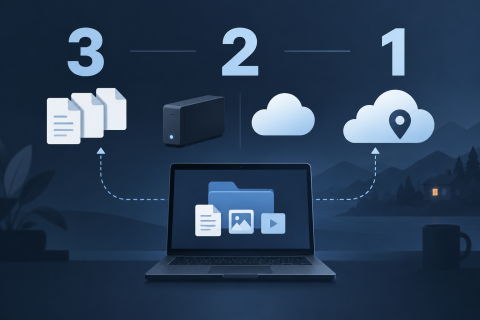
The 3-2-1 backup rule explained
Three copies, two kinds of storage, one off-site. The 3-2-1 rule is the shortest useful backup plan — here is what it means, where it falls short and how to put it together at home.
APPLE
Backing Up Your Apple Machine Using The Time Machine
Usually when a company sets out to release something new like a phone, a computer, or any other technologically hip new devices they can come up with they don’t give you any backup applications or programs that will help you out in case of a system restoration emergency. All of that is about to change with the Time …
APPLE
How to backup your iTunes Library onto an external hard drive?
It’s obvious that keeping iTunes library backups is mandatory to avoid data loss in case of a computer crash. But, doing backups with iTunes means that you have to stay beside the computer for many hours to change the Backup-DVDs about every 20 minutes.
APPLE
CopyTrans TuneSwift: How to transfer iTunes from one PC to another PC or Mac
If you have ever moved your data from one computer to another, you surely know what it is about. It is about many hours of the hard work. I’m sure you will love the tools that can help with this. One of them is a new CopyTrans TuneSwift which can be used as a migration or a backup assistant for your whole iTunes library.
APPLE
Free iTunes alternative? Try CopyTrans Manager
CopyTrans Manager is free alternative to iTunes, which allows you to fully manage your iPod, iPhone and iPad devices. This Windows software can be helpful in many needs you would like to do with these devices. Starting from the end of August 2010, CopyTrans Manager is fully compatible with iPhone 4 and the iPad.
APPLE
How to backup Apple iPad
Apple iPad, the tablet and nice piece of designer work. This extremely addictive tablet is a computer like any other in its basics. This means it can crash one day (is there anyone with broken down iPad?). So you should be sure all your data from the iPad are backed up. The other reason for Apple iPad backup is saving your apps which you have paid for. Fortunately, iPad backup is very easy to do.
IPHONE
CopyTrans 4: transfer iPod to iTunes/iPhone to computer
Have you ever lost your computer, had it stolen or accidentally erased your computer’s music? In those times, you’d probably wish you could recover your music from your iPod or iPhone! Fortunately I’m presenting you with the solutions that will allow you to do just that! Super easy, hassle free: CopyTrans 4!
IPHONE
CopyTrans 3 is out: backup for all iPod players and iPhones
I mentioned the previous version of CopyTrans earlier this year. This unique backup solution for iPod and iPhone owners offers great and simple way to backup all your data from these players and phones. Now, the new better version is available.
APPLE
How to Backup Files on Your PowerBook
The first thing we have to discuss within this article is what is a PowerBook? (However, since you stumbled upon this article you probably already know this) Mainly, the PowerBook is Apple’s replacement for the typical desktop computer. Frankly, I find that a laptop in my office is more useful than a full sized comp…
Backing up on Apple devices
Apple offers several ways to keep a copy: iCloud, iTunes or Finder on a computer, and Time Machine for Macs. These guides show how to turn each one on and how to restore from it.